> For the complete documentation index, see [llms.txt](https://docs.vechainkit.vechain.org/llms.txt). Markdown versions of documentation pages are available by appending `.md` to page URLs; this page is available as [Markdown](https://docs.vechainkit.vechain.org/vechain-kit-v1.x/vechain-kit/quickstart.md).
# Quickstart
{% hint style="danger" %}
Version 1 is DEPRECATED and won't be mantained. Please migrate to [Version 2](https://docs.vechainkit.vechain.org/intro/new-in-v2).
{% endhint %}
## 1) Install package
{% code overflow="wrap" %}
````sh
# Install dependencies
```bash
yarn add \
@emotion/styled@^11.14.0 \
@emotion/react@^11.14.0 \
framer-motion@^11.14.0 \
@tanstack/react-query@^5.64.2 \
@chakra-ui/react@^2.8.2 \
@vechain/dapp-kit-react@2.0.4 \
@vechain/sdk-core@1.2.0 \
@vechain/sdk-network@1.2.0
```
# Install vechain kit
```bash
yarn @vechain/vechain-kit@1.10.4
```
````
{% endcode %}
{% hint style="danger" %}
Only supported on React and Next.js
{% endhint %}
{% hint style="warning" %}
React query, chakra and dapp-kit are peer dependencies.
{% endhint %}
## 2) Define Provider
```typescript
'use client';
import {VeChainKitProvider} from "@vechain/vechain-kit";
export function VeChainKitProviderWrapper({children}: any) {
return (
{children}
);
}
```
On Next.js you will need to dynamically load the import
```typescript
import dynamic from 'next/dynamic';
const VeChainKitProvider = dynamic(
async () =>
(await import('@vechain/vechain-kit')).VeChainKitProvider,
{
ssr: false,
},
);
```
### Login Methods
The modal implements a dynamic grid layout system that can be customized through the `loginMethods` configuration.
The modal can be configured through the `VeChainKitProvider` props.
```typescript
{children}
```
{% hint style="warning" %}
Login methods selection:
* vechain, dappkit, and ecosystem are always available options
* The Privy-dependent methods (email, google, passkey, more) are only available when the privy prop is defined
* TypeScript will show an error if someone tries to use a Privy-dependent method when privy is not configured
```typescript
// This will show a type error
const invalidConfig: VechainKitProviderProps = {
// no privy prop specified
loginMethods: [
{ method: 'email' } // ❌ Type error: 'email' is not assignable to type 'never'
],
// ... other required props
};
// This is valid
const validConfig1: VechainKitProviderProps = {
// no privy prop
loginMethods: [
{ method: 'vechain' }, // ✅ OK
{ method: 'dappkit' }, // ✅ OK
{ method: 'ecosystem' } // ✅ OK
],
// ... other required props
};
// This is also valid
const validConfig2: VechainKitProviderProps = {
privy: {
appId: 'xxx',
clientId: 'yyy',
// ... other privy props
},
loginMethods: [
{ method: 'email' }, // ✅ OK because privy is configured
{ method: 'google' }, // ✅ OK because privy is configured
{ method: 'vechain' }, // ✅ OK (always allowed)
{ method: 'ecosystem' } // ✅ OK (always allowed)
],
// ... other required props
};
```
{% endhint %}
{% hint style="info" %}
By default we have a list of default apps that will be shown as ecosystem login options. If you want to customize this list you can pass the `allowedApps` array prop. You can find the app ids in the [Ecosystem](https://dashboard.privy.io/) tab in the Privy dashboard.
{% endhint %}
## 3) Setup Fee Delegation (mandatory if allowing social login)
Fee delegation is **mandatory** if you want to use this kit with social login. Learn how to setup fee delegation in the following guide:
{% content-ref url="/pages/GQxTTArVf9E5itgO7t1i" %}
[Fee Delegation](/vechain-kit-v1.x/social-login/fee-delegation.md)
{% endcontent-ref %}
## 4) Setup Privy (optional)
If you have your own Privy app, you can pass an additional prop with your settings.
```javascript
import { VechainKitProvider } from '@vechain/vechain-kit';
export default function App({ Component, pageProps }: AppProps) {
return (
{children}
);
}
```
Go to[ privy.io](https://privy.io) and create an app. You will find the APP ID and the CLIENT ID in the **App Settings** tab.
For further information on how to implement Privy SDK please refer to their docs:
This project uses:
* [*@privy-io/react-auth*](https://www.npmjs.com/package/@privy-io/react-auth) for Privy connection type
* [*@privy-io/cross-app-connect*](https://www.npmjs.com/package/@privy-io/cross-app-connect) for ecosystem cross app connection
You can import privy from the kit as
```typescript
import { usePrivy } from "@vechain/vechain-kit";
const { user } = usePrivy();
```
{% hint style="warning" %}
If you setup your own Privy be sure to go over the recommended security settings provided by Privy: \
and
{% endhint %}
{% hint style="info" %}
**Pros of self hosting Privy:**
* No UI confirmations on users transactions
* Allow your users to backup their keys and update security settings directly in your app
* Targetted social login methods
**Cons:**
* Price
* Responsibilities to correctly secure your Privy account, since it contains access to user's wallet settings
* Your users will need to login into other apps through ecosystem mode
{% endhint %}
## 5) Setup Legal Documents (optional)
To prompt users to review and accept your policies, like **Terms and Conditions**, **Privacy Policy**, or **Cookie Policy,** VeChainKit offers a simple plug-and-play solution.
You can avoid building your own if you haven't already.
By enabling also the tracking consent, you will allow VeChainKit to prompt your users to collect data to improve the kit.
***
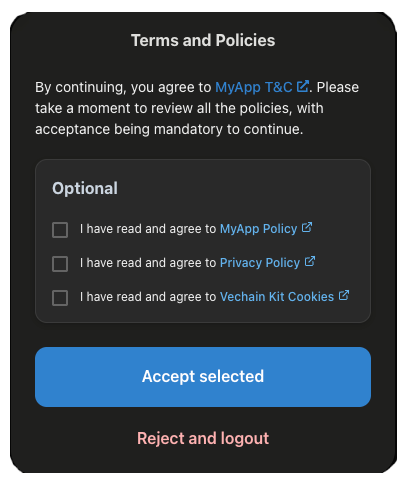
When the `legalDocuments` option is configured, the users will see:
* **Left:** A **modal prompt** when connecting their wallet, requiring them to review and accept required and optional legal documents.
* **Right:** A **summary view** under `Settings > General > Terms and Policies`, showing which policies they’ve accepted and when.
Legal Docs Modal
Legal Docs Summary View
***
{% hint style="info" %}
**Important**
Legal document agreements are tied to the **wallet address**, **document type**, **document version**, and the **url**.
* If the `version` of any document is updated, users will be prompted to accept it again.
* Agreements are stored in the browser’s **local storage**, meaning acceptance is **per browser and device**.
* As a result, users may be prompted again if they switch browsers, devices, or clear their local storage even if they've previously agreed on another setup.
{% endhint %}
```typescript
import { VechainKitProvider } from '@vechain/vechain-kit';
export default function App({ Component, pageProps }: AppProps) {
return (
{children}
);
}
```
**Key Options**
Option
Type
Required
Description
allowAnalytics
boolean
No
If true, prompts users with an optional tracking policy.
cookiePolicy
array
No
One or more cookie policy versions.
privacyPolicy
array
No
One or more privacy policy versions.
termsAndConditions
array
No
One or more T&C versions.
## 6) Show the login button
Once you set up the kit provider, you are good to go, and you can allow your users to login, customizing the login experience based on your needs. You can choose between many options, leaving you complete freedom on your design.
{% tabs %}
{% tab title="1) Use WalletButton component" %}
You can use this component by importing it from the kit, it will handle for you the connection state and show a login button if the user is disconnected or the profile button when the user is connected.
```typescript
'use client';
import { WalletButton } from '@vechain/vechain-kit';
export function Page() {
return (
);
}
```
Read more [here](#wallet-button) on how to customize this button.
{% endtab %}
{% tab title="2) Create a custom button" %}
Alternatively, you can create your own custom button and invoke the connect modal or account modal based on your needs.
```typescript
'use client';
import { useConnectModal, useAccountModal, useWallet } from '@vechain/vechain-kit';
export function Page() {
const { connection } = useWallet();
const {
open: openConnectModal,
close: closeConnectModal,
isOpen: isConnectModalOpen
} = useConnectModal();
const {
open: openAccountModal,
close: openAccountModal,
isOpen: isAccountModalOpen
} = useAccountModal();
if (!connection.isConnected) {
return (
);
}
return (
);
}
```
{% endtab %}
{% tab title="3) Call targeted login methods" %}
Only available for apps with self hosted Privy .
This is an example of doing login with Google custom button, for more in depth details read [here](/vechain-kit-v1.x/vechain-kit/hooks/login.md).
```typescript
// Example usage of Login hooks
import {
useLoginWithOAuth,
} from '@vechain/vechain-kit';
const ExampleComponent = () => {
// OAuth authentication
const {
initOAuth,
} = useLoginWithOAuth();
const handleOAuthLogin = async (provider: OAuthProvider) => {
try {
await initOAuth({ provider });
console.log(`${provider} OAuth login initiated`);
} catch (error) {
console.error("OAuth login failed:", error);
}
};
return (
{/* OAuth Login Options */}
);
};
export default ExampleComponent;
```
{% endtab %}
{% tab title="4) Allow only DAppKit" %}
You can allow users connect to your app only with wallet by using the dapp-kit connect modal, as follows:
```typescript
import { useDAppKitWalletModal } from '@vechain/vechain-kit';
export const LoginComponent = () => {
const { open: openWalletModal } = useDAppKitWalletModal();
return (
)}
```
{% endtab %}
{% endtabs %}
{% hint style="warning" %}
When your app is opened inside VeWorld mobile wallet, VeWorld is always enforced as a login choice.
{% endhint %}
## Support for devs
Are you having issues using the kit? Join our discord server to receive support from our devs or open an issue on our Github!
Check our [Troubleshooting section](/vechain-kit-v1.x/vechain-kit/troubleshooting.md).
Contact us on Discord:
Open an issue on Github: