# What's VeChain Kit?

<figure><img src="/files/yEWCeZ2RkLxaEsz8sECN" alt=""><figcaption></figcaption></figure>

It offers:

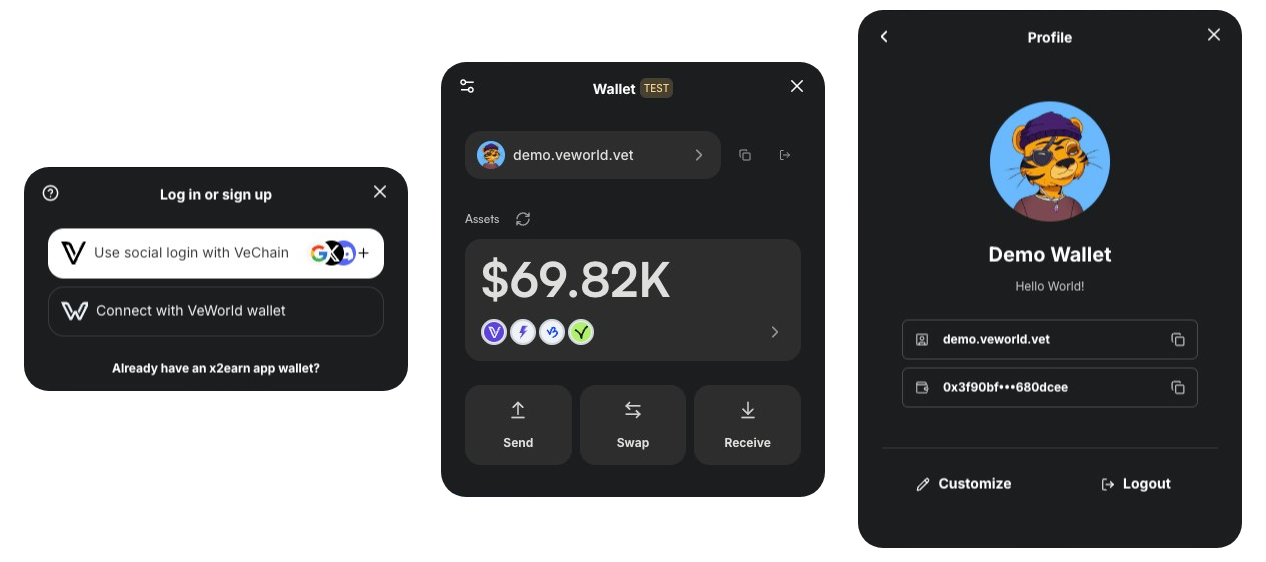
* **Seamless Wallet Integration:** Support for VeWorld, WalletConnect, and social logins.
* **Developer-Friendly Hooks:** Easy-to-use React Hooks that let you read and write data on the VeChainThor blockchain.
* **Token Operations:** Send and swap tokens, check balances, manage VET domains, and more—all in one place.
* **Pre-Built UI Components:** Ready-to-use components (e.g., `TransactionModal`) to simplify wallet operations and enhance your users’ experience.

## 🚀 Start with AI

The fastest way to build with VeChain Kit is to hand a prompt to your coding agent (Claude Code, Cursor, or any agent). The prompts below tell the agent to read the relevant [VeChain AI Skill](https://github.com/vechain/vechain-ai-skills) first so it follows current conventions.

{% tabs %}
{% tab title="Start a new dApp" %}
{% code title="Paste into Claude Code, Cursor, or any AI agent" overflow="wrap" %}

```
Before doing anything, read these VeChain AI Skills so you follow current conventions:
- create-vechain-dapp: https://github.com/vechain/vechain-ai-skills/tree/main/skills/create-vechain-dapp
- vechain-kit: https://github.com/vechain/vechain-ai-skills/tree/main/skills/vechain-kit

Now the task:

Scaffold a new VeChain dApp for me using create-vechain-dapp, with:
- VeChain Kit pre-wired (Privy social login: Google + email, plus VeWorld and WalletConnect)
- Chakra UI v3 (with next-themes) and dark mode by default — follow the next-chakra-v3 example in the vechain-kit repo for wiring the kit's `theme` prop via `useChakraContext().token.var(...)` so theme tokens stay reactive
- A landing page that shows the connected user's address, B3TR balance, and a "Send B3TR" button
- A GitHub Pages deploy workflow ready to use

Name the project "my-vechain-dapp". When done, run `yarn dev` and tell me the URL.
```

{% endcode %}
{% endtab %}

{% tab title="Add to existing project" %}
{% code title="Paste into Claude Code, Cursor, or any AI agent" overflow="wrap" %}

```
Before doing anything, read this VeChain AI Skill so you follow current conventions:
- vechain-kit: https://github.com/vechain/vechain-ai-skills/tree/main/skills/vechain-kit

Now the task:

I already have a Next.js app and I want to add VeChain Kit to it.

1. Install @vechain/vechain-kit and any required peer deps.
2. Find my root layout (app/layout.tsx for App Router or pages/_app.tsx for Pages Router) and wrap it with VeChainKitProvider.
3. Enable Privy social login (Google + email), VeWorld and WalletConnect.
4. Read Privy keys from NEXT_PUBLIC_PRIVY_* and the WalletConnect projectId from NEXT_PUBLIC_WC_PROJECT_ID.
5. Add a <WalletButton /> to my existing header.
6. Don't change my existing Chakra theme.

If you hit peer-dependency conflicts, stop and tell me before applying any fix.
```

{% endcode %}
{% endtab %}
{% endtabs %}

{% hint style="info" %}
**Install the VeChain AI Skills once** to give every future prompt automatic domain context:

```bash
npx skills add vechain/vechain-ai-skills
```

Or in Claude Code: `/plugin marketplace add vechain/vechain-ai-skills`. Browse all 11 skills live at the [VeKit Playground](https://playground.vechainkit.vechain.org/ai-skills).
{% endhint %}

Prefer to wire it yourself? See the [manual installation guide](/quickstart/installation.md).

<table data-view="cards"><thead><tr><th></th><th data-hidden data-card-cover data-type="image">Cover image</th><th data-hidden data-card-target data-type="content-ref"></th></tr></thead><tbody><tr><td>VeKit Playground</td><td><a href="/files/zn83vmfIV7MwNZCvapL7">/files/zn83vmfIV7MwNZCvapL7</a></td><td><a href="https://playground.vechainkit.vechain.org/">https://playground.vechainkit.vechain.org/</a></td></tr><tr><td>Homepage</td><td><a href="/files/zn83vmfIV7MwNZCvapL7">/files/zn83vmfIV7MwNZCvapL7</a></td><td><a href="https://vechainkit.vechain.org/">https://vechainkit.vechain.org/</a></td></tr><tr><td>NPM Package</td><td><a href="/files/mD4H5MAoSBwr8Y5ufrqn">/files/mD4H5MAoSBwr8Y5ufrqn</a></td><td><a href="https://www.npmjs.com/package/@vechain/vechain-kit">https://www.npmjs.com/package/@vechain/vechain-kit</a></td></tr><tr><td>Getting Started</td><td><a href="/files/BdVPcVx0YHV9oojvHqS7">/files/BdVPcVx0YHV9oojvHqS7</a></td><td><a href="/pages/cEqkWSfWI86VhmLx56xU">/pages/cEqkWSfWI86VhmLx56xU</a></td></tr><tr><td>Customization</td><td><a href="/files/KhCeR5zK43lzdTuD03P1">/files/KhCeR5zK43lzdTuD03P1</a></td><td><a href="/pages/U4VfGSXBXvRpBMtD2sSq">/pages/U4VfGSXBXvRpBMtD2sSq</a></td></tr><tr><td>Components</td><td><a href="/files/5RAmrT3FrIXLLSsjyk9M">/files/5RAmrT3FrIXLLSsjyk9M</a></td><td><a href="/pages/qAwfN6j3N4it8QpMhJyK">/pages/qAwfN6j3N4it8QpMhJyK</a></td></tr><tr><td>Troubleshooting</td><td><a href="/files/uzYdbWmw22v1FYm5Dxuh">/files/uzYdbWmw22v1FYm5Dxuh</a></td><td><a href="/pages/w35TVgE7Vr6Dx0TXjdEQ">/pages/w35TVgE7Vr6Dx0TXjdEQ</a></td></tr></tbody></table>


---

# Agent Instructions: Querying This Documentation

If you need additional information that is not directly available in this page, you can query the documentation dynamically by asking a question.

Perform an HTTP GET request on the current page URL with the `ask` query parameter:

```
GET https://docs.vechainkit.vechain.org/discover-vechain-kit/readme.md?ask=<question>
```

The question should be specific, self-contained, and written in natural language.
The response will contain a direct answer to the question and relevant excerpts and sources from the documentation.

Use this mechanism when the answer is not explicitly present in the current page, you need clarification or additional context, or you want to retrieve related documentation sections.